
To save IG video from Instagram, copy the link of the post, paste it into the box on Instatomp4, and press Download. The video lands on your device as an MP4 file you can watch offline. It takes about a minute and works for public posts and Reels.
Instagram’s own Save button doesn’t put a file on your phone. That’s why people look for a way to save IG videos to their camera roll or Downloads folder. The steps below cover iPhone, Android, and desktop, plus what to do when a video refuses to save.
What Does Save IG Video Actually Mean?
On Instagram, “save” can mean two different things. The bookmark icon under a post adds it to your Saved list inside the app, but the video still lives on Instagram’s servers. You need an internet connection to watch it, and it vanishes from your list if the creator deletes the post.
The other meaning is saving the file itself. You download the video as an MP4 to your camera roll or Downloads folder, where it stays even if the original post disappears. This guide covers the second one.
How to Save IG Video Step by Step
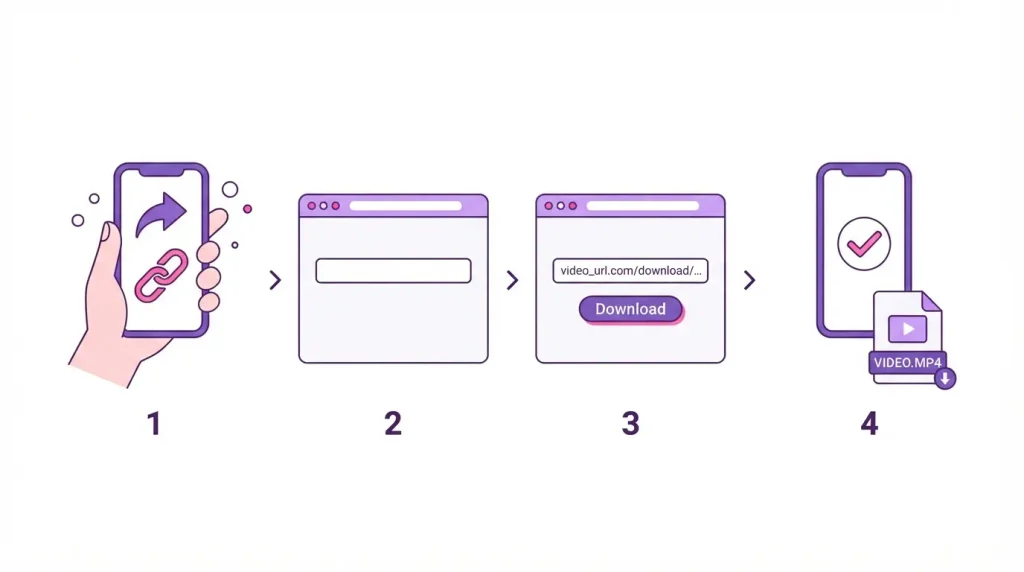
The method is the same on every device.
- Open the video in the Instagram app, tap the Share icon (the paper plane), and choose Copy link. On a computer, copy the address from your browser’s address bar.
- Open Instatomp4 in your phone or computer browser.
- Paste the link into the input box and press Download.
- Wait a few seconds for the video to load, then tap the download button to save the MP4.
You never copy the IG video itself, only its link. The only thing that changes between devices is where the file ends up.
How to Save IG Video to Your Phone or Camera Roll
iPhone
Safari is the safest browser to use on an iPhone. After the download finishes, the MP4 sits in the Files app under Downloads. To move it into your camera roll, open the file, tap the Share icon, and choose Save Video. It then shows up in Photos like any clip you recorded yourself.
Android
Chrome saves the MP4 to your Downloads folder, and most gallery apps pick it up automatically. Can’t find it in Gallery or Photos? Open the Files app and check Downloads, or tap the download notification right after the file finishes.
How to Save Video From Instagram on a PC or Mac
Instatomp4 is an IG video downloader online and a converter, so nothing needs installing. Paste the link in any browser and the file goes to your default Downloads folder.
Sometimes the browser plays the video in a new tab instead of saving it. When that happens, right click the video and choose Save video as.
How to Save IG Video Without Watermark
Download the original file with a tool that works from a link, instead of recording your screen. A screen recording captures everything on display, including the Instagram interface, notification banners, and caption text, and it lowers the video quality. Instatomp4 fetches the video itself and doesn’t add its own logo, so the MP4 looks the way it does in the post.
One exception: if the creator added a logo or username to the video before posting, it’s part of the picture and no tool can remove it.
What Quality Will a Saved Instagram Video Have?
The saved video matches what the creator uploaded, up to the limit Instagram stores. When you save IG video in HD, the result still depends on the original upload. A clip uploaded in 1080p can come out as HD, while a low resolution clip stays low. No downloader can add detail that isn’t in the file to begin with.
If a saved video looks blurry, check the original in the app first. Clips that get reposted several times are often compressed again at each step, so they lose sharpness before you ever touch them.
Can You Save Video From a Private Instagram Account?
No. A downloader can only reach videos that anyone can open without logging in, so posts from private accounts won’t work. Can’t view the post in a private browser window? Instatomp4 can’t fetch it either. The fair route is to ask the account owner to send you the file.
Saving a public video for your own offline viewing is fine. Reposting someone’s clip is another matter, so ask the creator first and credit them. Instagram also doesn’t tell creators when their public video gets saved.
Three Ways to Save Video From Instagram, Compared
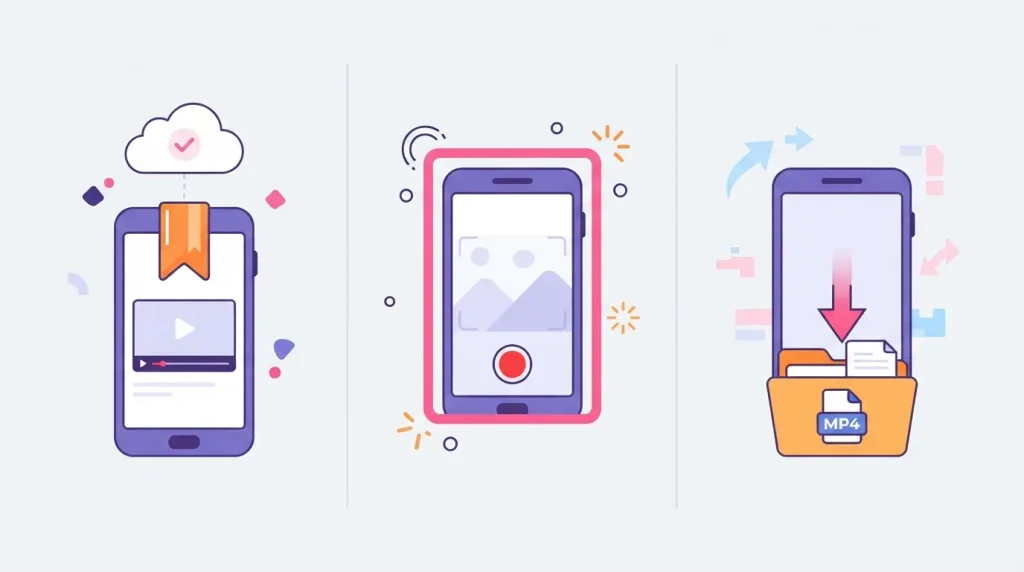
Instagram’s Save button is the fastest, but the video stays inside the app. It works for a list of Reels you plan to watch this week, and it’s useless when you want the file on a flight.
Screen recording works on every phone without any website, but the cleanup is the catch. You get a recording of the screen, so you have to trim the start and end, and the sound often picks up notification pings.
A downloader gives you the video file itself. Nothing to trim, and the MP4 opens in any video player or editing app. Every insta save video website follows this route, and it’s the one to use when you want to save insta vid clips for good.
Why Won’t My IG Video Save?
Most failures come down to one of four things. The account is private, so the link leads nowhere. The link came from the profile page instead of the video, so copy it again from the Share menu on the post. The post got deleted after you copied the link. Or the page was still loading, so wait ten seconds and press Download again.
None of these fit? Try a different browser. Some browsers block downloads that open in popups.
Frequently Asked Questions About Saving IG Videos
Is it free to save IG videos online?
Yes. Instatomp4 is free to use, and it doesn’t ask you to create an account. Paste the link, download the MP4, and repeat for the next video.
Do I need an app to save Instagram videos?
No. Instatomp4 runs in your browser on iPhone, Android, Windows, and Mac. Some apps ask for storage or account permissions that a browser tool never needs.
Can I save an Instagram Reel the same way?
Yes. A Reel is a video with its own link. Tap Share on the Reel, choose Copy link, and follow the same four steps above.
Can I save IG video audio only?
Not with Instatomp4. It saves the video as an MP4 and doesn’t pull the audio out as a separate MP3 file. If you only want the sound, you’ll need a different tool.
Can I save an IG video from a story?
Only while the story is live and only from a public account. Stories disappear 24 hours after posting, so copy the link before the timer runs out.
Will the person know I saved their video?
No. Instagram doesn’t send the creator a notification when a public video gets saved, and Instatomp4 never touches your Instagram account or theirs.
Is it safe to save Instagram videos with a downloader?
A downloader only needs the video link. If a site asks for your Instagram password, close it. Instatomp4 never asks you to log in.
Is it legal to save Instagram videos?
Saving a public video for your own offline viewing is generally fine. Copyright still belongs to the creator, so don’t repost, sell, or reuse a clip without their permission.
Save IG Video in Under a Minute
Copy the link, paste it on Instatomp4, and download the MP4. If the video is public, it’s on your device in a few seconds. Keep the creator’s name with the file if you plan to share it, and check the post link again whenever a download fails. Next time you need to save videos from Instagram, the same four steps will work.